
Buying Basics, Placement and Gear
How to Use a SPYPOINT Trail Camera
Learn how to use a SPYPOINT trail camera: charge and load it, aim it, set photo and video modes, check the app, and keep it running in the cold.
Plain comparisons of cellular, WiFi and SD card trail cameras and pop-up hunting blinds. Start with how you want your photos sent, how big a blind you need or the model you're weighing.
Learn how to use a SPYPOINT trail camera: charge and load it, aim it, set photo and video modes, check the app, and keep it running in the cold.

How to request video on Tactacam Reveal X 2.0: set video mode in the REVEAL app, wait for the next motion trigger, and download the clip.

Learn how to set up a Moultrie trail camera: pick a spot, mount it secure, load the right batteries, set date and mode, and get clear photos.
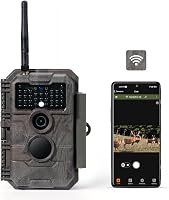
How do WiFi trail cameras work? They build their own short-range hotspot so your phone can see photos and live view, with no monthly fee or cell plan.

Learn how to program a Muddy trail camera: set date and time, pick photo or video mode, adjust interval and sensitivity, and format the SD card.

Does the SPYPOINT Flex-M have GPS? No, the camera itself doesn't, but the app uses location data to map and label your camera sites.

How to get pictures from trail camera cards and apps: pull the SD card, use a reader or Wi-Fi link, view shots on a phone, and keep the camera running.

How to set up a cellular trail camera: charge it, scan the coverage, aim it with a live view, pick a plan, and lock it down so photos keep coming.
Learn how to add a camera on Tactacam in the REVEAL app, from account setup and QR scan to naming, placement and confirming the first photo.